We are new and investigate Cryptomator. One very important issue for us is unattended/silent installation and even better, silent configuration (name, location, recoverykey, autostart app, etc, etc), .
Using the “*.exe /?” gave some install parameters including /install /quit /norestart and /log, which is a great starting point. Before we spent tons of time, we would like to know if there is already some info/documentation on this subject.
Searching on “unattended” and “silent” did no bring any info.
Thank you
Hello, everyone.
It seems that on the installer for the latest version V1.18.0, even the “*.exe /?” option is no longer working … it’s giving me an empty window.
I wish the “Setup” section of the docs could be a litte bit more specific on silent installation, especially since I learned from the changelog that the installer got a new option that is targeting Windows package managers.
Kind regards
lm_kd
@lm_kd Thank you for mentioning this. This is actually a bug. I created a ticket for the blank page, see EXE installer help page is empty · Issue #4102 · cryptomator/cryptomator · GitHub.
The installer help should look similar to this:

@infeo Thanks for confirming and for creating the ticket.
I’m new to Cryptomator and wasn’t sure whether the bug might be on my side.
Regards
lm_kd
Hi,
On Windows there is the option to install Cryptomator with Microsoft Winget.
I do it as needed, and you can request a silent install.
Just ask chatgpt for detailed instructions on using winget. It’s part of Windows 11 and should be in 10 if your using that.
Here are instructions you can follow to get you started:
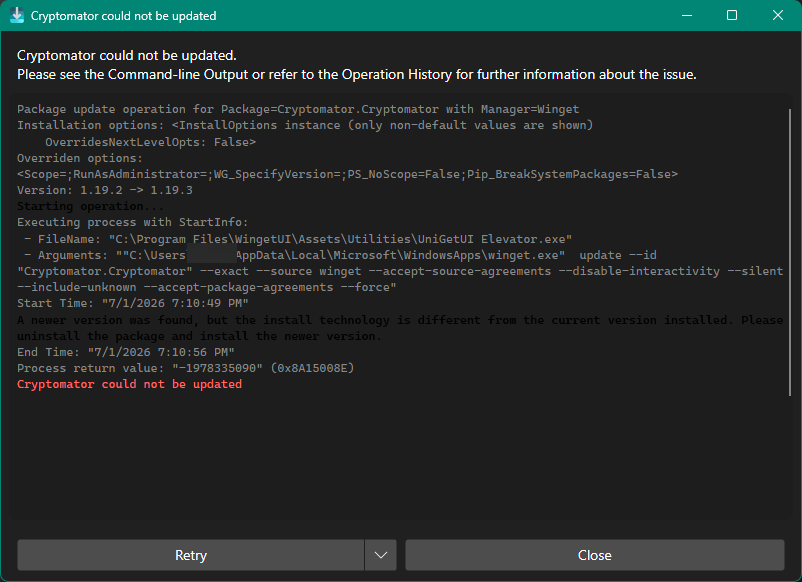
Hi,
When you run into that error what you need to do is uninstall cryptomator and then install it again using winget.
Winget’s a solid option for new installs, but switching from the website installer looks messy based on that error message. Probably worth sticking with what you’ve got if you’re already using the website version.
Hi,
All depends on your environment everybody’s different small office home user large scale office.
If you had a thousand workstations to maintain you would use Winget.
I have 4 pcs to maintain and upgrading every software program on every PC manually if I go into the website downloading the software running the installer deleting the installer. Not for me.
Winget has a companion gui app called unigetui. Installs either from ms store or yes winget. It runs in system tray and alerts you when any app on your PC has an upgrade available. Then it offers to install one or all upgrades.
Personal choice.