I’ve just started getting the following error when trying to copy a file to an unlocked folder, or create a folder.
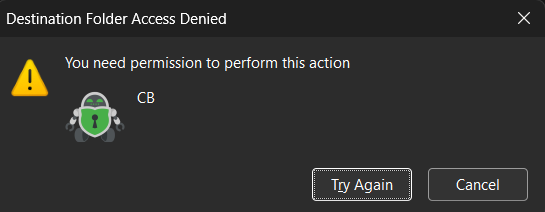
I’ve restarted my PC to no avail.
Thanks in advance!
Hi. Please check if the directory of your vault (where the encrypted files are stored) is not write protected.
Thank you for your suggestion, which I checked.
I created it in my Google Drive, and populated it with about 50 Gb. It suddenly stopped allowing me to copy files or even create a new folder. No write protection has been applied. I’ve not changed any settings; it just started throwing up this error message of its own accord.
What software are you using to mount Google Drive? Are you using the Google Desktop software for Windows or some other software like Rclone?
There’s also another app that’s very good and fast for mounting Google Drive.
It’s free for personal use. I have found it to be the fastest way to copy files back and forth to Google Drive.
I’m using the standard Google Windows 11 desktop software, which worked fine until about a week ago.
I use that also on my Windows desktop.
However because you’re having difficulties, it might be worth a comparison trial to see if ExpanDrive will work.
Also, please create a new vault, like a temporary vault, on Google Drive and see if you get better results. That will help us determine if the problem is related to the connection, or if it’s the vault, or if it’s Google Drive.
I’ve just created a new vault which works perfectly. Thanks for suggesting that! Is there a maximum that a vault can contain on a free licence? The one causing me issues is around 50 Gb.
Cryptomator does not impose a fixed gigabyte limit on the size of a vault. You can store hundreds of gigabytes or multiple terabytes of encrypted data in a single vault.
This applies whether your vault is stored on Google Drive, OneDrive, Dropbox, an external hard drive, or a local disk.
The practical limits come from the storage provider and your computer, rather than Cryptomator itself.
Only the mobile versions of Cryptomator have a charge or fee. The desktop version is free to use but you can upgrade to one that has additional features. Storage limits are not one of them.
I don’t have an immediate explanation for why you’re having trouble with your existing vault but at least you know you have a fallback solution, which is the new vault. It would suck to have to move 50 GB over there but perhaps one of the other support guys has a better answer than I have.
Hi,
Just realized that I forgot to ask you one other important question.
For your Google Drive software for Windows, there are two ways to set it up. One is to synchronize the Google Drive files down to your PC so that you have a local copy of them and then whenever you change a file, it syncs it up to the server. You also have the option to not store them on the local computer and have them in a mode called streaming. Do you have them in streaming mode or in synchronized (replicated) mode?
This is important to know because a synchronized vault is going to have the potential to have problems.
Remember all of your files are being stored inside a vault and when you add one file and then another file, you’re not adding two individual files. You’re adding two entries into the vault and Google Drive may want to synchronize the entire vault up to the server. Every time you add a new file to the local drive, this is where you can run into problems. I stream my vault from the server.
It is drive G: for me and none of the files are local to my computer.
All are streamed. I do have a couple of unrelated folders elsewhere in Google Drive that I synchronise so that I have access when I don’t have Internet, but the vault is fully streamed.
having other folders streamed or synchronized shouldn’t make a difference as long as the vault is.
Hopefully one of the senior support personnel will chime in soon.Perhaps they’ll have another idea.
UPDATE:
let’s try an experiment: see if you can create a file or copy a file to, or create a directory in the vault folder itself. See if you get a permissions error.
I get a permissions error if I try to do anything: copy a file, create a file, create a folder…
I’ve started moving things out of the old folder, and it won’t delete anything either. It pretends it has, then when I go back to the folder, everything is still there.
Unfortunately it might take longer to figure out what is wrong with your vault and fix it than it would take to copy all of your data into a clean vault.
It’s possible that there’s some corruption there that we can’t see and it could be difficult to figure out how to fix it.
Personally I would start with a fresh vault.