Hi and first of all, big thanks to the devs for this wonderful app !
I use it for personnal use to backup a large amount of files I don’t want to loose (pictures, documents, music, virtual machines images etc…). The total size of those files are about 500Go.
My original files are stored on a 4To usb-HDD.
I backup those files each night to a second 2To usb-HDD with a Free FileSync .bat script so that my backup directory is a mirror of the original one, all deleted files go into a Recycle Bin in the backup drive.
This setup kind of saved my life recently as my main HDD failed. But I wanted to add an additional cloud based backup.
I backup my really important files on Spideroak but the available space is limited.
Considering the price of a secure and efficient cloud storage, I thought it could be a solution to use my (virtually free) professional 1To OneDrive space.
For obvious privacy reason, I would have to encrypt all my files on OneDrive, and that’s where Cryptomator enters the game.
So I set my local OneDrive vault as a folder on my backup drive, created a Cryptomator Vault inside it as a “PRIVATE” folder and set FreeFileSync to backup the files in the virtual Cryptomator drive.
As a result (after 2 days of transfer), I have : my original files on the first drive, my backup files encrypted on the second drive, the encrypted-version files one-way syncronized on OneDrive.
In theory, all should be good. But I have no way to check it easily as Cyberduck or the IOS Cryptomator apps are not allowed to access my professional Onedrive (as far as I remember I also had this problem with rClone). I guess the only way to test would be to download the whole folder from Onedrive and mount it in Cryptomator, then perform a comparison with the original folder ?? Or is it possible to download only the main Cryptomator files and then a set of individual files to unlock them and do a sample check ?
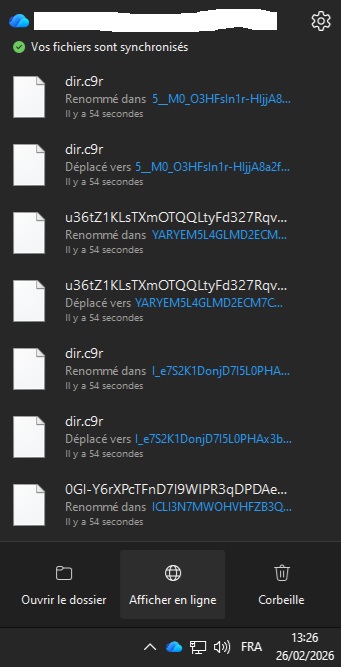
Second question : I notice constant moving/renaming of files in the OneDrive app. Please see the picture below as an example. Is this the expected behavior ? Could it corrupt the files or create some kind of problem?
My Cryptomator vault stays unlocked permanently, maybe that’s the reason? Otherwise I should make a script in order to unlock it some time before the sync each night, then lock it again after its completion.
why not? prohibited by the company? (Im asking because I am heavily using OneDrive on a business account without any issues)
You can run a health check and have a look in the log of your OneDrive client. If both doesnt show errors, then you should be fine. You can also make a size comparison (which should work without having to download all files that OneDrive has not local anymore).
No
Thats normal if you work with files. Every time a file in you vault is changed, the corresponding encrypted file is changing too.
I guess it’s related to the security policy of my company. When I try to log-in with one of those third party apps, it tells me that I must have an admin-level Microsoft account.
What do you mean by “health check”? I performed a Cryptomator Health Check, there is no error.
The OneDrive log files seem hard to read, I’ll try to install one of the tools to open them.
I made a global size and file number comparison, it seems OK but the size in OneDrive web interface is not really precise…if I could mount the online Onedrive folder I could do such analysis more easily but as I said, it’s locked.
The thing is I don’t do anything with those files except one time a day for the FreeFileSync batch. That’s why it seems strange to me…Also, looking at the “Last modification” dates on OneDrive web interface I don’t notice all those transactions. The last ones are from this morning!
I even tried to let the Cryptomator vault locked and check if those messages still appear and that’s the case. So, I don’t know…The client keeps staying in “Looking for modifications” mode, then always finds 184 modifications and perform them without transfering anything…just those “renaming/moving”… can’t explain!
It should be possible to show the size of your vault in explorer, even if you do use files on demand.
That’s not normal behavior. Something is changing your files then. Even change of meta data or an archive bit is a change. This must not necessarily be something that changes visible content of the file. Otherwise OneDrive wouldn’t update them.
I had to keep my main backup encrypted on my hard drive, which is less convenient
I found that “File on demand” is not compatible with a Onedrive folder located on an external drive. This could also be the reason of the strange behavior I encountered…
My setup now works perfectly :
original files on external drive 1
backup files on external drive 2 as a mirror of drive 1 with a daily FreeFileSync
Cryptomator Vault = a folder in my OneDrive Vault located on C:\ with “Files on demand” activated and a daily FreeFileSync of my original files
Everything seems to work fine this way, the FreeFileSync batches access all files without the need of downloading them and they all match “date + size” check. The new files implement correctly.
Doing some random testing I can access the files with no error.
I made an health check but had this error even if I don’t find any functional problem :
Check Directory Check
STATUS: SUCCESS
RESULTS:
CRITICAL - Check failed: Traversal of data dir failed. See log for details.
I will test further this setup but it seems to be a great solution !