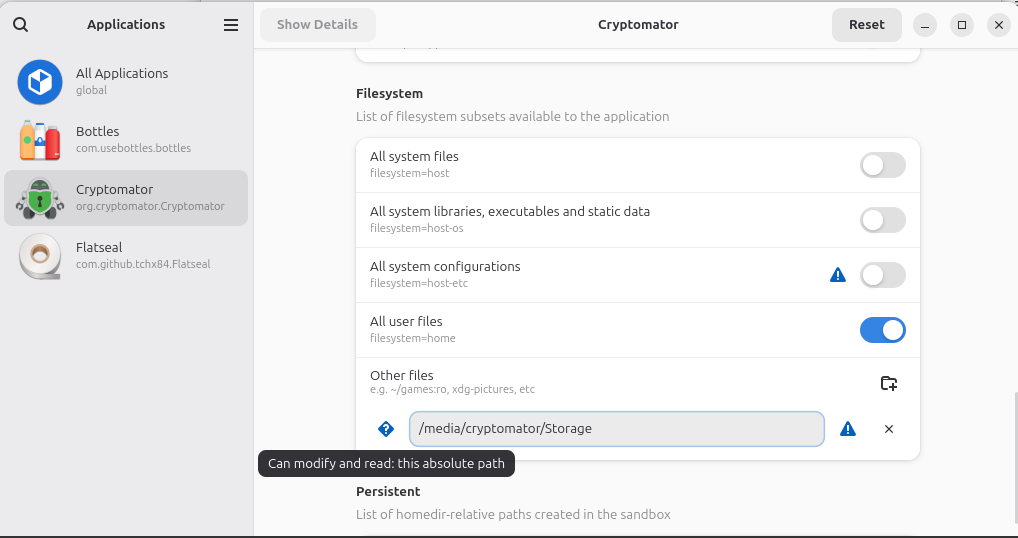
I am running Linux Mint 22.2.
Cryptomator is still unable to see this location when I attempt to create a vault:
< I’m not allowed to add a second screenshot, but when I click “Browse” in Cryptomator to create a vault, the 2nd partition still does not show up. >
I’ve rebooted & tried again, still no 2nd partition. Not sure what else is needed. This looked to be so easy.
Thanks
Not the greatest “blush” emoji, but…
So, IT IS THIS EASY!
opened 02:43PM - 09 Dec 22 UTC
documentation
## Description
If the vault is not located in the user home directory, it canno… t be chosen in the file picker dialog started by Cryptomator. Additionally, already existing vaults (i.e., added over the appimage) are not found, if not located in the home dir.
## Reason
Cryptomator flatpak is restricted to [only access the user home directory](https://github.com/flathub/org.cryptomator.Cryptomator/blob/1ec15d8651ebf9a9dd6ed074c2fd584c903d4fa2/org.cryptomator.Cryptomator.yaml#L12).
## Solution
Ensure Cryptomator is not running and then override the option with one of the following:
You can give the Cryptomator Flatpak complete access to your host file system, with the following command:
```
sudo flatpak override org.cryptomator.Cryptomator --filesystem=host
```
You can also only state where on the file system Cryptomator Flatpak should have access (e.g. to a specific directoy):
```
sudo flatpak override org.cryptomator.Cryptomator --filesystem=/media/my_thumb_drive
```
You can provide multiple filesystem options, so you could do any number of mount points, for example:
```
sudo flatpak override org.cryptomator.Cryptomator --filesystem=/media/festplatte --filesystem=home
```
If you prefer to use a GUI tool, you can use [Flatseal](https://flathub.org/apps/details/com.github.tchx84.Flatseal) to modify the permission accordingly.
Taken from https://community.cryptomator.org/t/cryptomator-flatpak-doesnt-find-safes/9613/2?u=infeo
Also! Make sure you not only close Cryptomator after making the change but ALSO that it is not still running/set to run at startup (not showing in the Panel System Tray).
Doh…